An MCP server for ChatGPT, Claude + any AI that speaks MCP
The workout app
you never open.
Workout Memory gives ChatGPT, Claude and any AI with MCP support a permanent memory for your training. Say what you did, in your own words, at the gym, on the bike, on the mat, or hours later. Each workout becomes history your AI can actually answer from.
// free in early access · one URL · setup ≈ 2 minutes
Logged · push day · today
New bench 5×5 best, up 2.5 kg since 28 May.
01 / the idea
Logging was an app.
Now it's a sentence.
Apps like Strong perfected detailed workout logs. Workout Memory keeps the log and drops the app: lifting, yoga, spinning, mobility and conditioning all become part of the same history. Say it, it's saved. Ask, and it remembers.
Under the hood it's an MCP server — the open standard for giving AI apps tools and memory. To you it just means your assistant gains 18 precise tools for logging, recalling and correcting workouts, behind one sign-in that you control.
02 / how it works
Three moves. One is talking.
Connect once
Add it to ChatGPT, Claude or any MCP client as a custom connector: paste one URL, sign in, approve. Two minutes, once, on phone or desktop.
Talk like you train
“squats 5×5 at 100, then RDLs.” Voice or text, during the workout or after. It resolves your phrasing into real exercises and flags anything it assumed.
Ask like it was there
“when did I last train legs?” “bench PR?” “plan Friday around my numbers.” Answers come from your actual history, not vibes.
03 / what it remembers
A memory built for training.
live_sessions
Start a session at the gym and append sets as they happen. Forget to close it? It finishes itself after 18 hours.
sets_minutes_distance
Sets, reps, loads, minutes, distance and notes. Structured history, not a text blob lost in a chat thread.
best_sets_and_history
Per-exercise history with best efforts when relevant, so a PR gets called out the moment you beat it.
your_vocabulary
“DLs”, “that cable thing”. It learns what your words mean, and remembers corrections for next time.
training_context
Goals, preferred units, the equipment you actually have, so plans fit your reality.
full_control
Edit, merge or delete workouts by saying so, and browse your whole log on the web after signing in.
04 / set up
Two minutes to a memory that never misses a set.
Step zero: create your free account. You'll approve the connection with it.
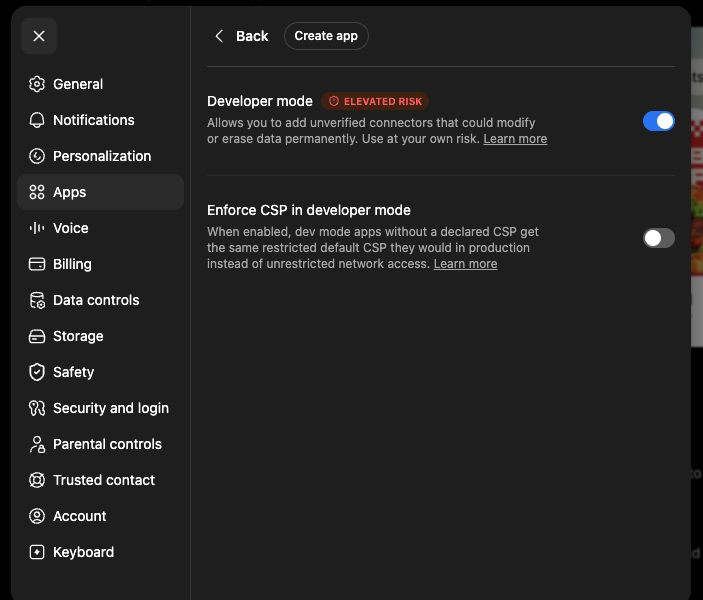
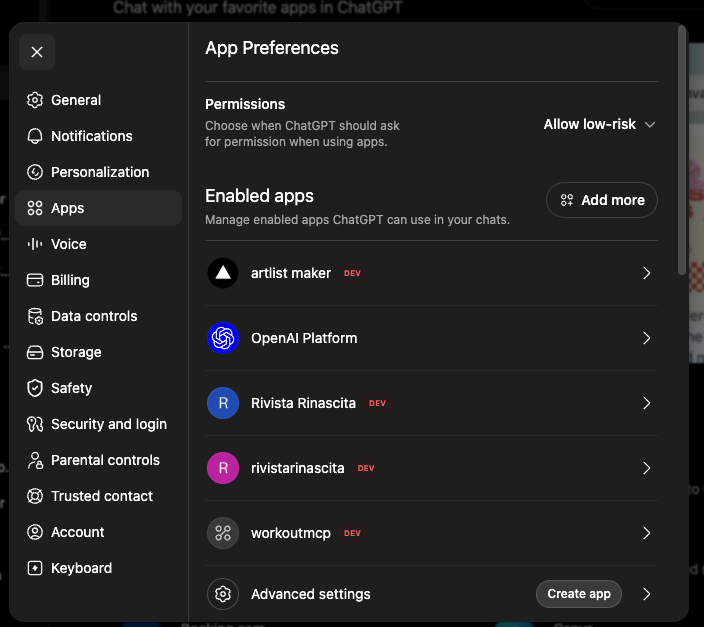
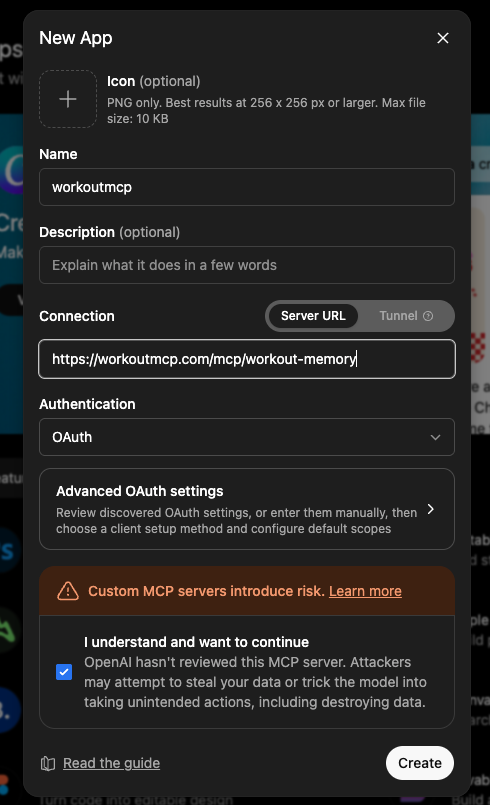
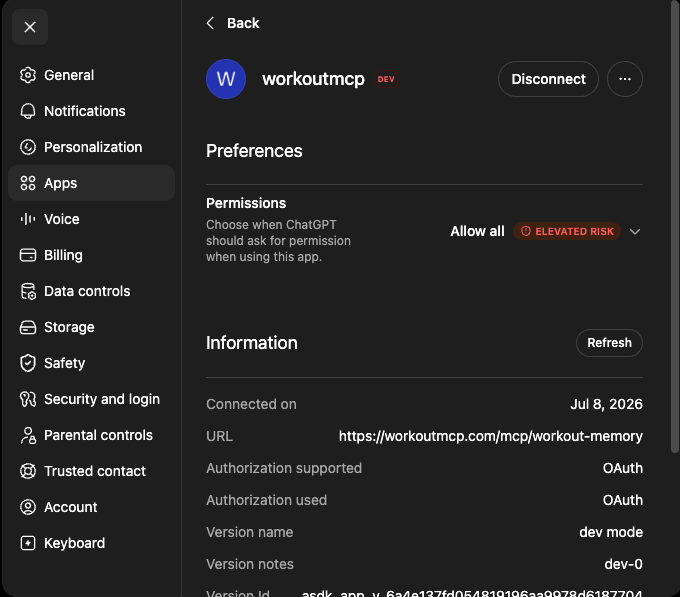
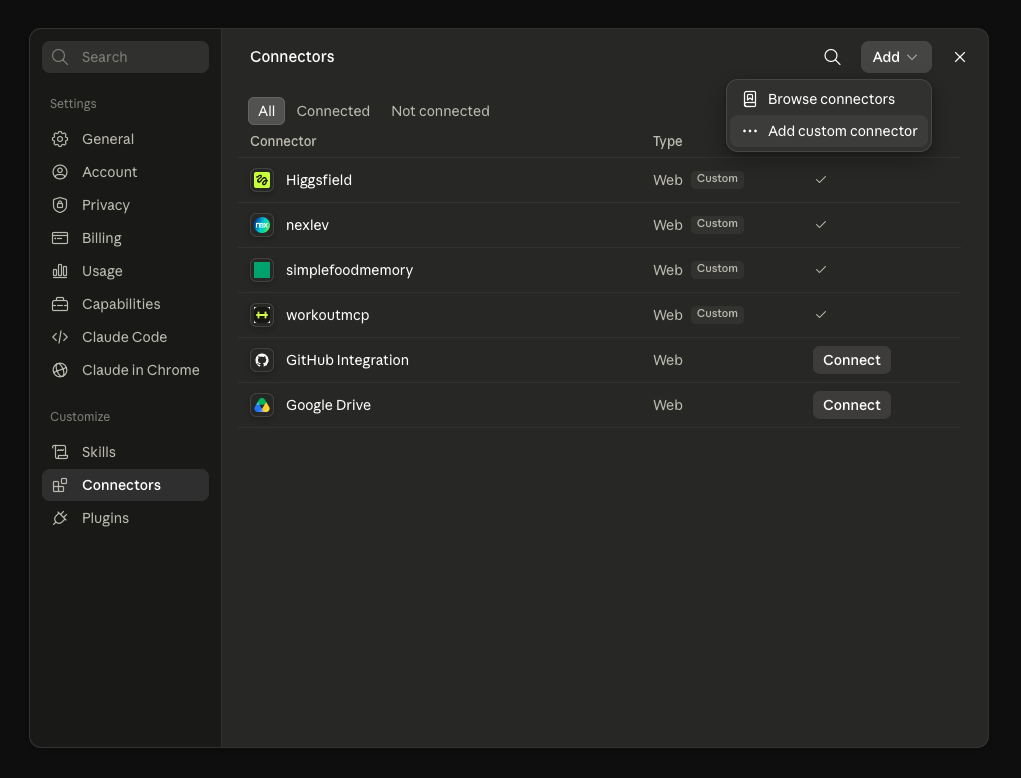
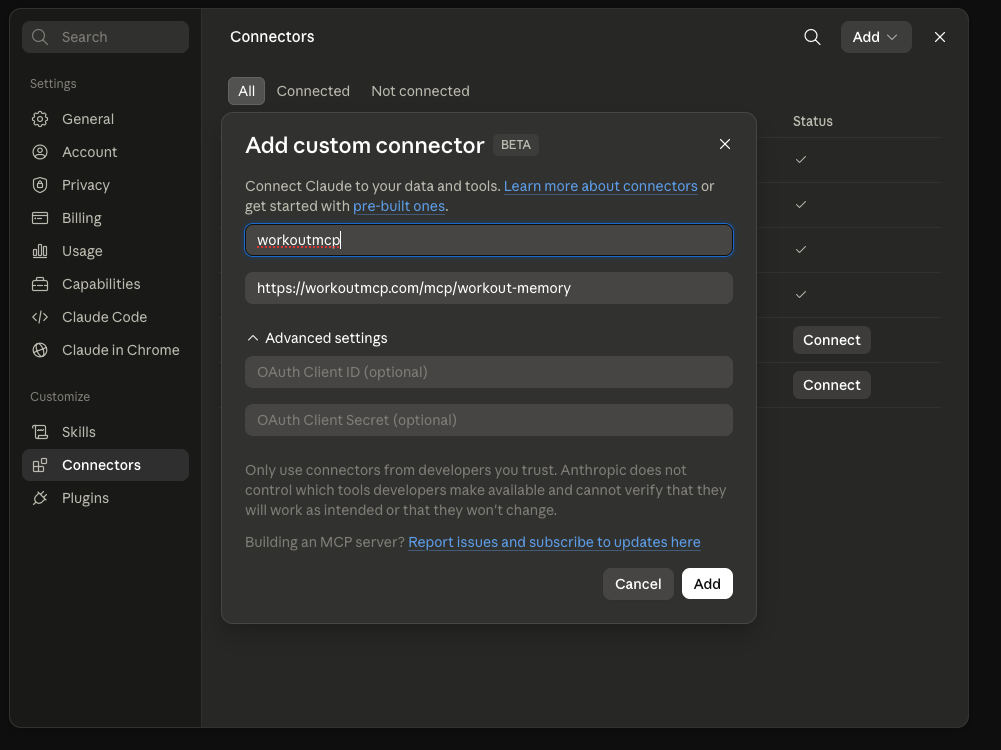
or let your AI install it for you
Don't want to hunt through menus? Hand your assistant this prompt. It knows its own settings and will walk you through them.
I want to connect an MCP server called "Workout Memory" to this app. MCP endpoint: https://workoutmcp.com/mcp/workout-memory (streamable HTTP with OAuth sign-in). Guide me through adding it as a custom connector in this app, step by step, using the exact menu names I will see here. If I need an account first, send me to https://workoutmcp.com. Once it is connected, ask me what I trained today and log my first workout.
05 / faq
Fast answers.
What do I need? +
An account here, plus ChatGPT (custom connectors via developer mode, on paid plans) or Claude (custom connectors). Claude Code and any other MCP client work too.
Is it free? +
Free during early access. Create an account, connect your AI, and start logging.
What gets stored, and where? +
Your workouts, exercises and the training context you choose to share — kept in your account on our EU-hosted server. Your AI reads it only through the tools you authorized, and you can browse everything after signing in on the web. Workouts stay private unless you ask for a share link, and you can revoke one anytime.
What if it gets an exercise wrong? +
It flags assumptions instead of guessing silently. Say “that was front squats, not back squats” — the log gets fixed and your phrasing is remembered for next time.
Can I add old workouts from my notes? +
Yes. After connecting Workout Memory, paste a chunk of your old training notes or CSV-like data into ChatGPT or Claude and ask it to add them. The assistant splits the text into normal dated session logs, so start with a week or month at a time if the file is large.
Do I have to log live at the gym? +
No. Dump the whole session in one message afterwards, or log set-by-set as you go — both land in the same history. Live sessions auto-close after 18 hours if you forget.
Contact us
Need help?
Questions about setup, account access, workout corrections, or data deletion go straight to support.